Introduction for the SoapUI Newbie
So you have downloaded and installed SoapUI. Smart move, you’re on your way to testing greatness! SoapUI is a very extensive tool though, and sometimes it takes some time to understand it in its entirety. Here are 10 very basic tips on how to use SoapUI; following them might not necessarily make you a better tester, but it will make you a more proficient user, and that’s a good first step.
Please note the following: These tips are very basic. They are based on some common mistakes the absolute beginner tends to do, but might seem a bit simplistic for the sophisticated user.
We'll start off very simply with an important principle on how to interact with SoapUI.
1) Right Click your way around
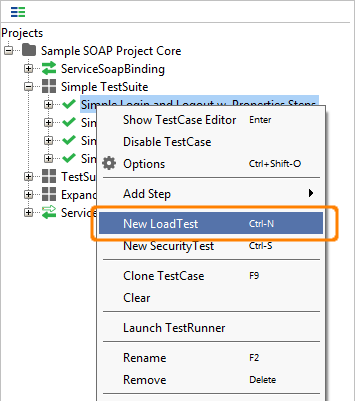
This first tip might seem simple, but consider it a soft start.
SoapUI is very deep TestWare and as such there is so much you can do. Unfortunately most people never discover all the features available since SoapUI is not very… let’s call it “Bullish on menus”.
So, the simple tip is; wherever you might be in the SoapUI interface, Right Click on any item you would like to interact with and see what shows up, you might be surprised. This is very basic, but once you realize that SoapUI is all about right clicking, working with the software will become so much easier.
Next tip will address how to structure your tests in SoapUI.
Tip 2) Place your tests in a TestCase
There is a certain structure to how SoapUI wants you to handle your tests, based on Best Practices, and you benefit so much from using that structure. That structure is not terribly hard to use, most testers structure tests like that already. Here is how it works: you have a group of tests, called TestSuites that contains the actual tests, called TestCases. A TestCase can in its turn contain a number of steps, called TestSteps. That's it.
If you follow the TestSuite, TestCase, TestStep structure you have so much to gain. Test reuse is easier; you can clone or copy tests as well as refer to them from other tests. It’s also much easier to run them as LoadTests in LoadUI. Not only will the structure have technical benefits, it will also make testing easier for you; a well-structured test project will make navigation easier as well as provide a more clear overview of the amount of tests created and their purpose and method.
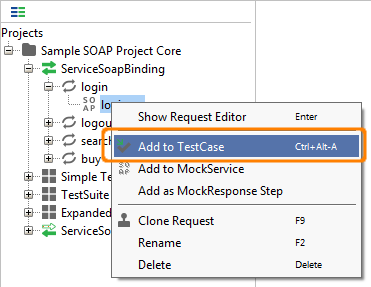
How do you take a request and put it in a TestCase? Well, try right clicking it (remember tip 1?) and select Add to TestCase. If you already have a TestCase you want to add the request to, you can just drag and drop it.
Next tip will address how you should name your tests once you have created them in the structure we heve learned here.
Tip 3) "What's in a name? That which we call a test"
Now when we have learned the importance of using the SoapUI Test Structure, let’s look at how you can improve the test readability. When you create a new TestCase SoapUI offers an easy name for you, this is very helpful and even a very good solution in some cases, but not when you try building a serious industrial TestSuite. Letting SoapUI names a test like TestSuite 3 or TestCase 349 will work fine when you have a handful of tests, but will you remember in 3 months or years’ time what TestCase 349 did? Or will your Test Buddy you share the ReadyAPIject with understand what TestCase 349 does?
Instead spend some extra time and go for a name that helps you understand what the test does, for example, “TestSuite for validating that Customer Data Updates work” or “TestCase that tests increase of Reseller Discounts ”.
It makes interacting with the project much easier especially if you work hard at naming the TestSuites well as well, finding “TestCase that tests increase of Reseller Discounts ” is so much easier if it is in a TestSuite named “TestSuite for changing Reseller Terms”. If you have worked with naming the project it will be much easier to relearn after not touching it for a period of time and it also helps you understand what kinds of tests that are missing. “So I have a TestCase that tests increase of Reseller Discounts, why isn’t there one that tests decreasing of them”.
Wild tangent:
Also, as the quote from Shakespeare in the heading for the tip discusses, doesn't the naming of an item alter the item itself? Isn't a test named "TestCase for adding a customer with too long SSN" in the TestSuite "TestSuite with negative tests for adding Customer" a much stronger and valid test than "TestCase 2" in "TestSuite 45"? Even though it's functionally identical? Doesn't the sign alter the signifier? And we're not talking about how we perceive the signifier, but the actual Signifier itself.
A good piece of advice is also using the same way of naming Items in your project; doing this makes it easier to both name new Items as well as understanding them.
Now that we have looked at how to name your tests, we'll look at some tips about performing tests. Next tip is about the necessity of Assertions.
Tip 4) To assert or not to assert: that should never be a question
Testing in SoapUI is all about the assertions. Without them you can’t properly say that you have performed a test. This begs the question: so, what is an assertion then? Simply put, assertions are checks that what you receive is what you expected to. An example; I have a Web Service where I search for a product by product id. In the response I expect the same product id in the field named product id. If I do manual testing, I send the request and then look for the matching id in the response. This is what we call asserting. As you can see assertion is an integral part of testing, yet quite a fair share of testing in testware is done without assertions, and we'd like you to get into the habit of performing them in SoapUI. An example of an assertion would be to say, “If the response contains the company name eviware, the service I’m testing seems to work”.
Creating assertions is real simple in SoapUI; you create them by going to the Assertion Tab in the SoapUI request/response editor.
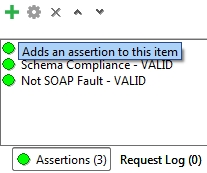
In the editor you click the button for New Assertion and then choose which type of assertion you would like. At first you can start off with a very simple assertion like the Contains assertion, which checks the entire response for a text, and then quickly moves to the more accurate XPath assertion (look at ReadyAPI, the XPath assertions are real simple there), where you check for a text in a certain element in the response. The Contains assertions says "I want the text 'eviware' to be in the response", while XPath says "I want the text 'eviware' to be in the Company Name element response".
So now, go ahead and create an assertion:
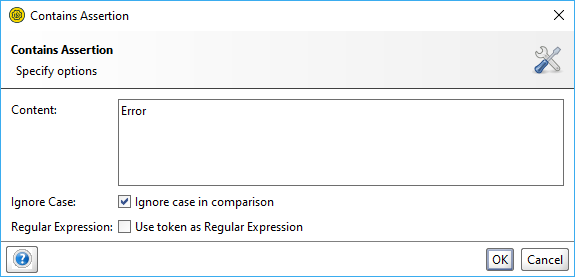
See how easy it is? Don't stop there; try the other assertions as well and figure out how they work.
Now it's time to move to the next level of SoapUI. A question we often get from new users are; "How do I take something in the response and use it in the next Request", or in SoapUI-speak, "How to I transfer the contents of an element in a response and put it in an element in a request?". It will all be revealed in the next tip; Tip 5) Learn how to Transfer Properties
Tip 5) Learn how to Transfer Properties
The second most used feature in SoapUI after assertions would be the Property Transfer. Since it's so widely spread, it's obviously useful, but what is it for? Well, the most common scenario in your SoapUI testing is probably that you would like to take a value in a response and move it to a request; for example, you get a sessionID in a response after a logging in and must use that sessionID in all subsequent requests. This is a very common scenario and Property Transfers helps you achieve this. Since transferring properties are so important and central there are two ways of doing it; Property Transfer TestSteps or Property Expansions. They both work fine, what you use is a matter of personal taste.
Both are extremely simple to do in ReadyAPI and a little harder in the Open Source version, but it doesn’t matter; learn how to do it!
Let’s see some screen shots from the SoapUI Sample Project to show how it works.
The Property Transfer Step is a TestStep in the TestCase (see tip 2) that uses XPath expressions to select values and to place them, for example in a request.
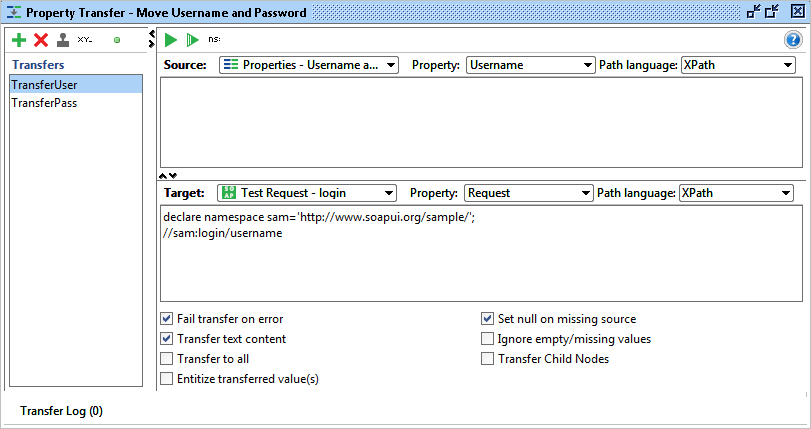

The Property Expansion uses SoapUI’s internal format for referencing to other parts, for example an element in a request in SoapUI
Read more about Property Transfer here http://www.soapui.org/Functional-Testing/transferring-property-values.html and Property Expansion here http://www.soapui.org/Scripting-Properties/working-with-properties.html
Next Tip; Tip 6) Read the Response
Tip 6) Read the Response
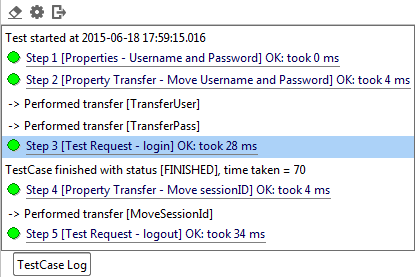
This is a short one, but very useful. When you have done the tests, you can see the results, step by step, by looking in the Test Log. This log is available for both TestSuites and TestCases and will show you every step that the tests run.
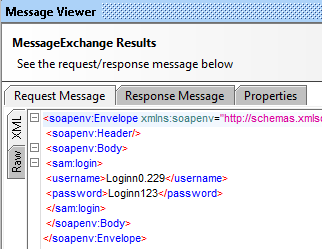
If you click on the Test Step you will see the actual result.
Of course, this is very important when something fails, but also interesting when something is successful. Looking at the actual test run can be used to verify that the test ran correct.
Next tip: Use the log!
Tip 7) Read the Log
SoapUI logs quite extensively what happens in the software; a good way to expand your knowledge about what’s happening in the tests is learning to use the logs in order to see what’s going on. Let’s look at a very common example. You send a request, but aren’t getting any response back in the SoapUI Response window.
There are a number of logs in SoapUI telling you what might be wrong. For example, create an HTTP test (that is, Testing Web for us deadly people) for the following URL; http://www.ghiklj.com, and send the request. You will not see anything in the SoapUI Response window, but were you to look in the SoapUI Log, you would see the following:
Fri Jul 30 15:57:08 CEST 2010:ERROR:Exception in request: java.net.UnknownHostException: www.ghiklj.comFri Jul 30 15:57:08 CEST 2010:ERROR:An error occured [www.ghiklj.com], see error log for details
Fri Jul 30 15:57:08 CEST 2010:INFO:Error getting response for [HTTP Test Request]; java.net.UnknownHostException: www.ghiklj.com
Looking in the Error Log you see this:
Fri Jul 30 15:57:08 CEST 2010:ERROR:java.net.UnknownHostException: www.ghiklj.com

java.net.UnknownHostException: www.ghiklj.comat java.net.PlainSocketImpl.connect(Unknown Source)
at java.net.SocksSocketImpl.connect(Unknown Source)
at java.net.Socket.connect(Unknown Source)at java.net.Socket.connect(Unknown Source)
at java.net.Socket.(Unknown Source)at java.net.Socket.(Unknown Source)at org.apache.commons.httpclient.protocol.DefaultProtocolSocketFactory.createSocket(DefaultProtocolSocketFactory.java:80)
at org.apache.commons.httpclient.protocol.DefaultProtocolSocketFactory.createSocket(DefaultProtocolSocketFactory.java:122)at org.apache.commons.httpclient.HttpConnection.open(HttpConnection.java:707)at com.eviware.soapui.impl.wsdl.support.http.SoapUIMultiThreadedHttpConnectionManager$HttpConnectionAdapter.open(SoapUIMultiThreadedHttpConnectionManager.java:1666)at org.apache.commons.httpclient.HttpMethodDirector.executeWithRetry(HttpMethodDirector.java:387)
at org.apache.commons.httpclient.HttpMethodDirector.executeMethod(HttpMethodDirector.java:171)
at org.apache.commons.httpclient.HttpClient.executeMethod(HttpClient.java:397)
at com.eviware.soapui.impl.wsdl.submit.transports.http.HttpClientRequestTransport.sendRequest(HttpClientRequestTransport.java:187)
at com.eviware.soapui.impl.wsdl.WsdlSubmit.run(WsdlSubmit.java:122)
at java.util.concurrent.Executors$RunnableAdapter.call(Unknown Source)
at java.util.concurrent.FutureTask$Sync.innerRun(Unknown Source)
at java.util.concurrent.FutureTask.run(Unknown Source)
at java.util.concurrent.ThreadPoolExecutor$Worker.runTask(Unknown Source)
at java.util.concurrent.ThreadPoolExecutor$Worker.run(Unknown Source)
at java.lang.Thread.run(Unknown Source)
Although this is an exception in the error log, it does not mean that is something wrong with SoapUI, studying the error message more carefully, you’ll quickly realize that the URL you entered does not exist. This is what reading the logs can help you with; finding out what's happening in the software.
Tip 8) Do a quick Load Test
Yes! Load Testing is a tip!
Wow, doesn't load testing take loads of time? Doesn't it take weeks of preparation? Nope, Load Testing is not scary or complicated at all. As a matter of fact; in SoapUI it’s even easy and won’t take you more than 10 seconds to create. Just right click (Yep, there is that Right Click again, remember tip 1?) a Functional Test, choose New LoadTest and, Hey Presto, you’re ready to go!
But what's the value of creating the test? What will it do for me? Since a LoadTest is so easy to create, that means the overhead is slim and any warnings about performance issues you can find early on are very useful. Creating a quick load test can potentially save you a huge potential head ache in the future.
And if you want to take it one step further, download LoadUI and run the Load Tests there. It's very easy and intuitive and works the same way; right click and run. LoadUI also gives you the ability to scale the tests later. First distributed to internal machines and later into cloud driven massive distributed monsters!
So don't wait, do your first Load Test. Today.
Following the first 8 tips you now should be a pretty decent SoapUI'er. We'll end with two good tips for reaching the next level of SoapUI masterdom. Coming up, Tip 9) RTFM!
Tip 9) RTFM!
For all and any record; the heading above is written with the utmost respect and limitless love. We're just trying to be a bit shocking but funny and this is the best we can come up with.
This tip might feel pretty obvious; if you’re reading this page you obviously understand the value of reading the manual. But let’s be honest here, nobody likes reading a manual. But the manual can be helpful, and we have put a lot of effort and love into it and it will cover a lot of your needs. We’d like to highlight a few features in the documentation;
- The Sample Project.
There is a sample project in the SoapUI Installation (In the Tutorials folder in the SoapUI Installation Folder). It’s great way of figuring out how SoapUI works. There even is a tutorial around the sample project which is easy to follow. You can find it in the Getting Started Section.
- The Getting Started Section.
Go to the Web Site. Go To the Getting Started Section. Use the tutorials, they are pretty great!
- Search in SoapUI.
SoapUI has got a great search functionality which lets you search the SoapUI Community Forums. There are a lot of smart people hanging out there, so use them to find answers and also to ask questions.
- Search in SoapUI.org.
We have spent a lot of time creating a very nifty search in the web site. Use it all the time!
Now, if you don’t like the Forums or dislike the documentation or think the tutorials can be better, what do you do? Go to tip 10!
Tip 10) 3, 2, 1, Activate!
If you feel like a SoapUI Beginner, don’t worry, there are thousands of you every week. Instead of hiding in your cubicle ashamed that you don’t have a black belt in SoapUI, go out there, search for information and be active.
There are a lot of good blogs and articles out there about SoapUI, take a look in our In the News Section on the SoapUI Web Site. http://www.soapui.org/soapUI-in-the-news/
Also, go to the SoapUI Forums, http://www.soapui.org/forum, but don’t be a lurker. Talk to the other users, answer questions you know the answer to and ask for answers to the questions you have.
We also really appreciate any feedback, even “you suck!” because if you tell us why we suck we can work at sucking less.
That's it!
You're now a fully fledged SoapUI Master and ready to investigate what more SoapUI can offer. Thanks for reading these tips, we hope they have helped you.