You use request parameters to set varying parts in simulated requests. SoapUI supports the following parameter types:
- QUERY
- TEMPLATE
- HEADER
- MATRIX
You can find them in the request editor:
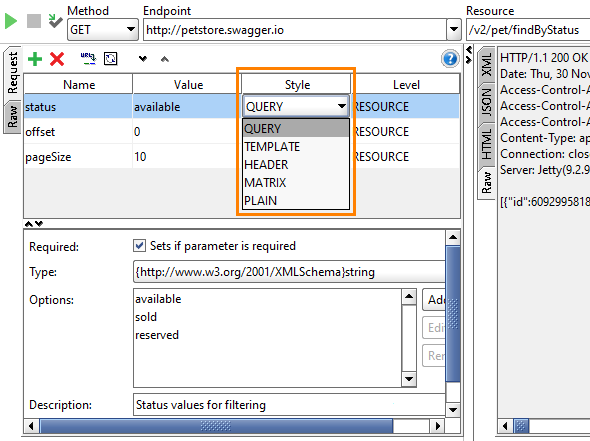
The drop-down list also includes an additional PLAIN type. You use it in SoapUI to make testing more flexible (see below).
NOTE: This page describes setting REST request parameters in SoapUI Open Source. Some images on this page, though, have been captured in ReadyAPI – the next-generation API testing tool that provides extended support for REST web services in comparison with SoapUI Open Source. If you have not tried ReadyAPI yet, download a free trial version and see why so many fans of SoapUI have moved to Pro.
This article walks you through how to understand REST Parameters in SoapUI. If you want a more broad understanding of what REST Parameters are, read more about the topic in Understanding REST Parameters and Headers.
QUERY Parameters
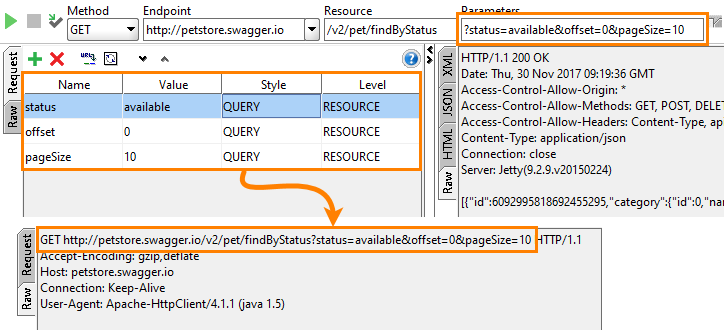
QUERY parameters appear in the URL after the question mark (?) after the resource name:
https://myserver.com/resource-name?param1=value1¶m2=value2
In SoapUI, you can see them at the top of the REST Request editor:
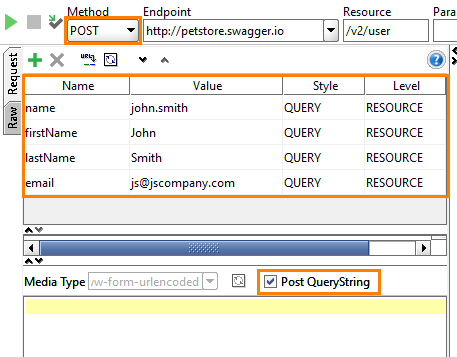
If you submit an HTML form, you use a POST or PUT request. For such requests, you can include parameters of the QUERY type into the request body. To do this, simply select the Post QueryString check box:
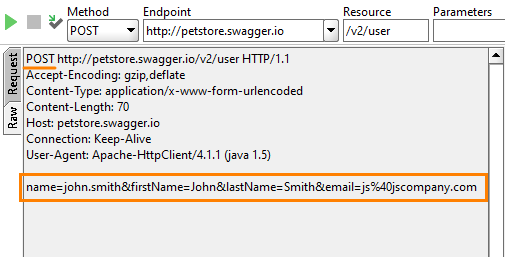
This will remove QUERY parameters from the URL and will add them to the request body. You can see this in the Raw page after you simulate the request:
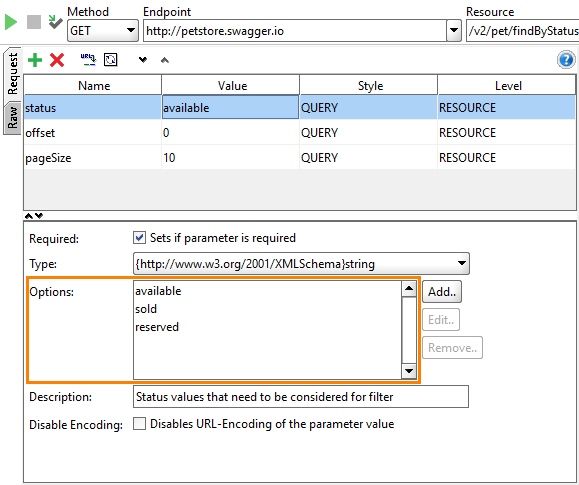
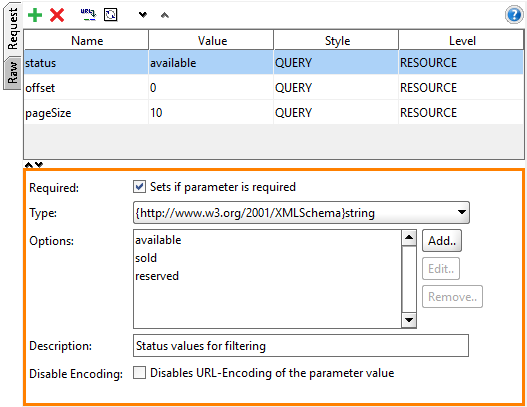
In the image above, we used the Options box to list available values:
If you use the Form page to configure parameters (available in ReadyAPI), you can set the value easily by selecting it from the drop-down list:
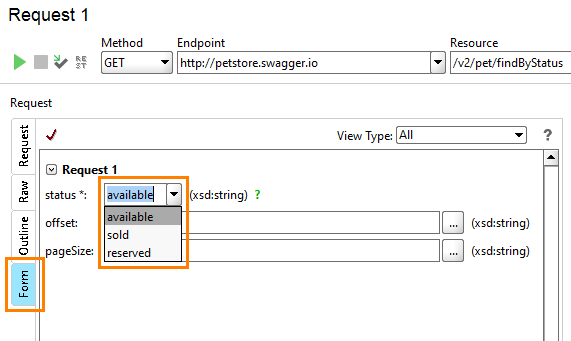
If the Options list is empty, the parameter can store any value that matches its data type.
HEADER Parameters
HEADER parameters are passed in the headers of outgoing requests:
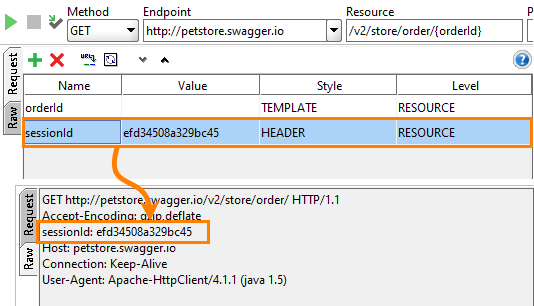
TEMPLATE Parameters
These parameters appear in resource paths. They give API developers a flexible way of parameterizing resources:
http://myserver.com/some-path/parameter/path-continued/parameter2
For instance, the FreeGeoIP REST API expects the data format and IP address in a resource URL:
http://freegeoip.net/json/10.70.12.8
You define these parameters in SoapUI in the following way:
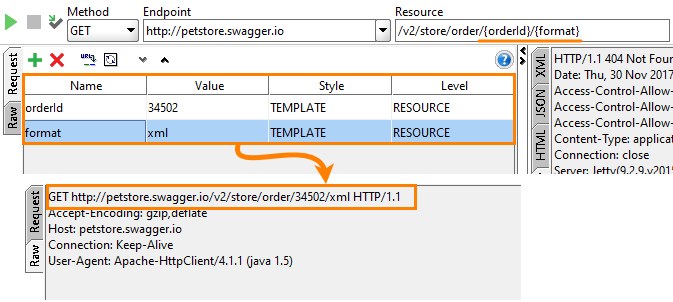
Note: It is meaningful to create TEMPLATE parameters at the RESOURCE level (for more info on levels, see below). If you define this parameter at the METHOD level, SoapUI will not add it automatically to the resource paths in method items. You will have to do this manually, which is not very convenient.
MATRIX Parameters
These parameters also go in the request URL. They reside between the resource path and QUERY parameters, and are separated from the resource path by a semicolon (;):
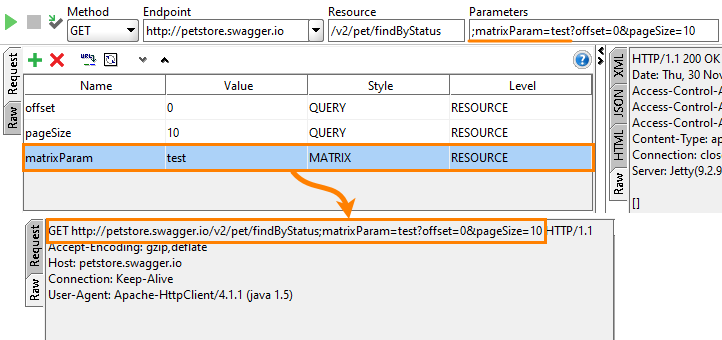
Parameters of this type are not as common as TEMPLATE or QUERY parameters. However, SoapUI supports them because they are defined in WADL.
PLAIN Parameters
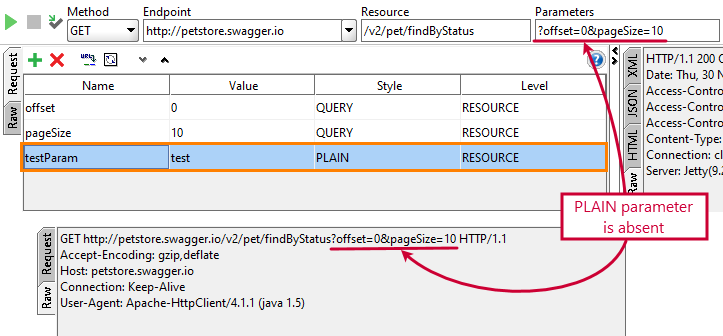
SoapUI also uses the PLAIN parameters. These parameters are present in the request editor, but SoapUI does not include them into simulated requests. You can change the type of some parameter to PLAIN to exclude this parameter from request simulation easily. You can change the parameter type back, if needed (this will free you from creating the parameter and entering its value later):
Parameter Level: RESOURCE and METHOD
In SoapUI editors, you can define parameters at the RESOURCE or METHOD level:
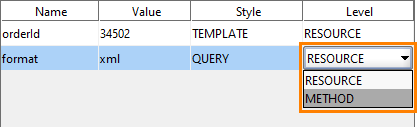
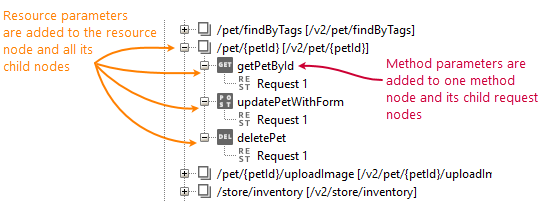
The RESOURCE level means that the parameter you create will be added to all method and request items under the resource item. The METHOD level means the parameter will be added to the request items below the method item only, It will not affect the resource and other method items.
SoupUI Open Source
- Support for SOAP and REST API Testing.
- Easy multi-environment switching.
- Detailed test history and test comparison reporting.
SoupUI Pro
- Support for SOAP, REST, and GraphQL API Testing.
- Easy multi-environment switching.
- Detailed test history and test comparison reporting.
Parameter Properties
You can create and delete parameters in the request editors that you called for the resource > method > request items in the Navigator panel. In the editor of the REST Request test step, you can only change the parameter values:
The settings you make in the request editor work as default settings for the test step editors.
SoapUI uses the following properties for parameters:
| Property |
Description |
| Required |
Set if test steps should specify the parameter value or if they can skip it |
| Type |
Specifies the parameter data type |
| Options |
A list of possible values for the parameter. Use it for convenient editing of request parameters (see above) |
| Description |
An arbitrary text describing the parameter. Use it to provide a quick hint for the parameter in test step editors |
| Disable Encoding |
If a parameter values goes in a URL and contains some special symbols like spaces or slashes, then SoapUI by default will replace these symbols with their codes. For example, if a parameter value contains a space or a slash, SoapUI will automatically replace them with %20 or %2F. In certain cases, you may want to disable such encoding. Select this check box to do this |
Next Steps
REST Testing Tutorial
SOAP vs. REST 101: Understand the Differences
REST Resources and Methods
Working With REST Requests
Mocking REST Services