SoapUI comes with support for testing WSDL / SOAP based services. For enhanced functionality, try ReadyAPI for free.
- Easy import of WSDLs and default request generation allows for ad-hoc testing and exploring of services
- Support for commonly used standards like WS-Security, WS-Addressing, WS-ReliableMessaging, MTOM, etc allow for testing of advanced services and scenarios
- Integrated WS-I compatibility testing tools allow you to validate both your contracts and messages for industry-standard compliance
- The SOAP Request TestStep allows for extensive functional testing and validation of services through a variety of assertion and scripting possibilities
- Load testing of SOAP/WSDL Services is supported as a natural extension to SoapUI functional tests
- Service Simulations (“MockServices”) can be instantly created from your WSDL and run inside SoapUI for simulating both simple and complex client behavior
- A graphical front end for generating code with the most popular web service development frameworks is provided, allowing you to easily compared frameworks and their artifacts
- All functional tests, load tests and MockServices can easily be run both from inside SoapUI and via included command-line tools.
- WSDL Coverage functionality gives you a unique insight into the coverage of your tests in relationship to the tested contracts; have you tested all elements? Attributes? Etc...
- WSDL Refactoring allows you to automatically update your tests and simulations to be compliant with new versions of your WSDLs
- Advanced editors and wizards in ReadyAPI make testing and exploring of services easy for non-technical users and testers.
Getting Started
Getting started with some ad-hoc testing of a SOAP service is straight forward; select the “New Project” option from the File menu, which will prompt the following dialog:
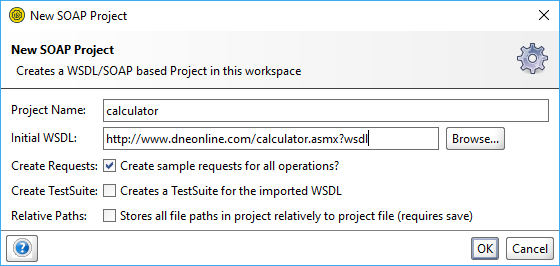
Paste the WSDL path http://www.dneonline.com/calculator.asmx?wsdl into the Initial WSDL/WADL field (the Project Name will be extracted from this) and press OK. SoapUI will work a bit and create the project with the imported WSDL available in the navigator. Go straight to the first “Request 1” request generated for the Add operation and double-click it, which opens the following window:
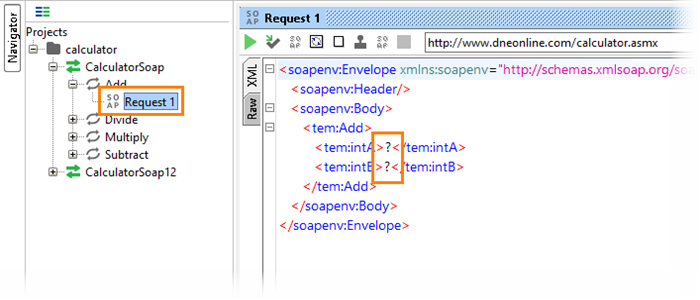
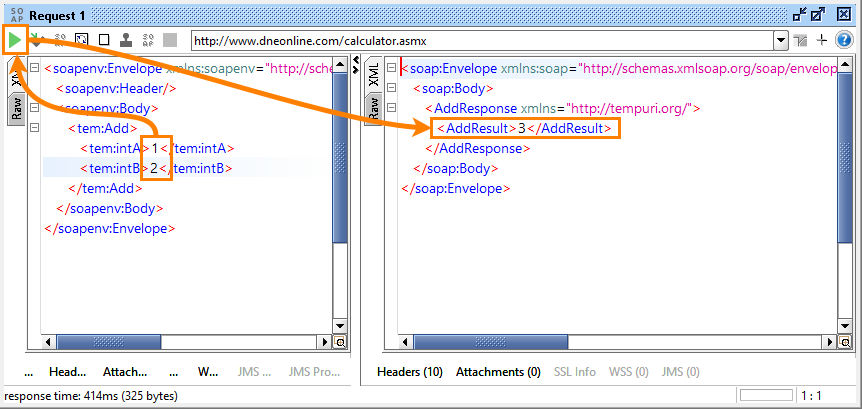
Now all you have to do is enter two integer value and press the green arrow on the top left to submit the request to the target service, which will return a nice response for you:
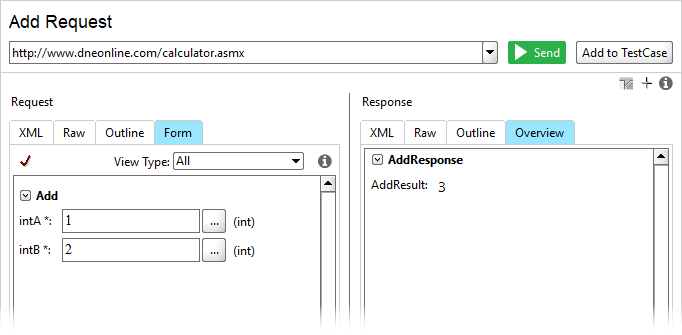
If you are using the pro version of SoapUI, or have a general dislike for XML syntax, you can use the Form view instead for the request and Overview for the response:
That’s it, you’ve done your first Ad-Hoc test of a SOAP Web Service, now dive into the details to get to grips with all the possibilities!

SoapUI Open Source
- Support for SOAP and REST API Testing.
- Easy multi-environment switching.
- Detailed test history and test comparison reporting.

SoapUI Pro
- Support for SOAP, REST, and GraphQL API Testing.
- Easy multi-environment switching.
- Detailed test history and test comparison reporting.
Next Steps
Working With WSDLs
Operations and Requests
Authenticating SOAP Requests
SOAP vs REST APIs: Understand The Differences
SOAP Attachments and Files